بِسْمِ اللَّـهِ الرَّحْمَـٰنِ الرَّحِيمِ
Challenge Overview
Trust Issue is a Windows Disk Forensics challenge created by MAb0EL3TA (Mahmoud Mostafa) for the EYCC CTF 2026 Qualifiers.
The challenge provides a copy of the victim’s logical C: drive. The objective is to reconstruct the attacker’s phishing attack, identify the communication vector, unpack the initial execution chain, discover the LOLBin and persistence mechanism, and recover deleted text messages left behind.
1. Initial Communication & Phishing Vector
Q1: The victim interacted with the threat actor on a specific chat platform to receive a requested document. What is the name of this communication application?
Examining the victim’s Chrome browser history SQLite database located at:
C:\Users\mm370\AppData\Local\Google\Chrome\User Data\Default\HistoryOpening History with DB Browser for SQLite and inspecting the urls table:
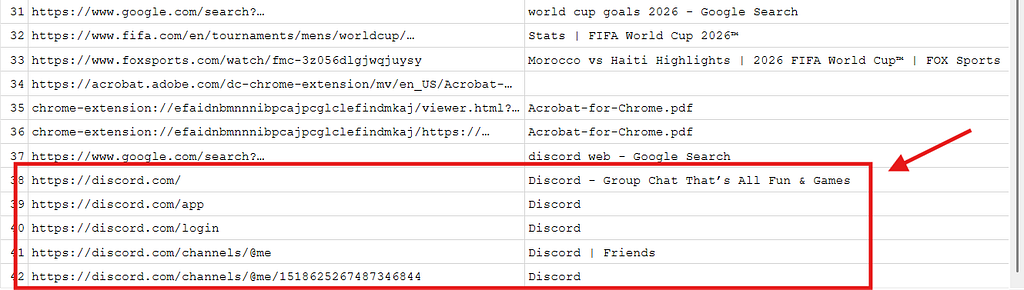
The victim accessed Discord via the browser.
- Answer:
discord
Q2: What is the ID of the conversation between the attacker and the victim?
From the visited Discord URL identified in browser history:
https://discord.com/channels/@me/1518625267487346844The Direct Message channel ID is directly present in the path.
- Answer:
1518625267487346844
Q3: The attacker mentioned the password used to unzip the folder containing that malicious pdf, what is the used password?
Since the conversation occurred inside Google Chrome, the messages are cached inside Chrome’s cache directory:
C:\Users\mm370\AppData\Local\Google\Chrome\User Data\Default\Cache\Cache_DataUsing ChromeCacheView to parse and filter cache entries by the channel ID:
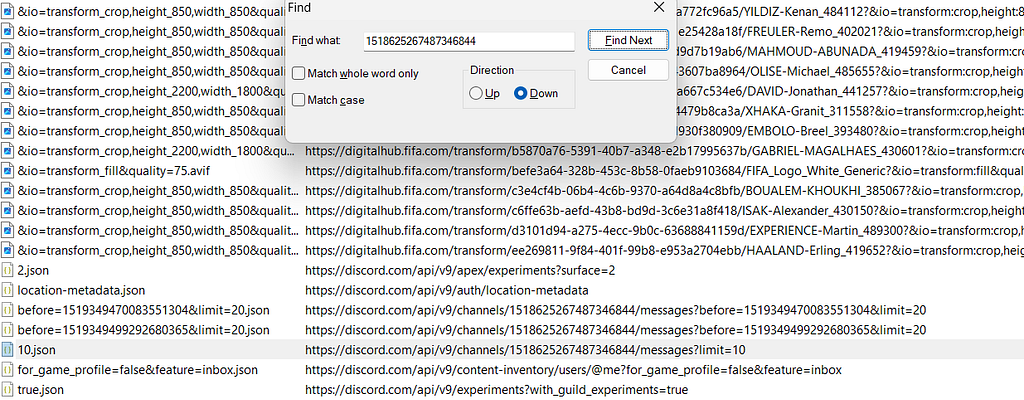
Inspecting 10.json reveals the attacker’s chat message providing the password:

Password: 1233m7SeNshE7at3
Attachment: Nexora_Documents.7z- Answer:
1233m7SeNshE7at3
2. Initial Execution & LOLBin Analysis
Q4: The victim reported that upon double-clicking the supposed HR document a Command Prompt window briefly flashed on the screen before the document opened. What is the exact name of the hidden batch script that was executed via the command line arguments?
In the user’s Downloads folder, the extracted archive contains a disguised .lnk shortcut file. Parsing the shortcut metadata using LECmd.exe:
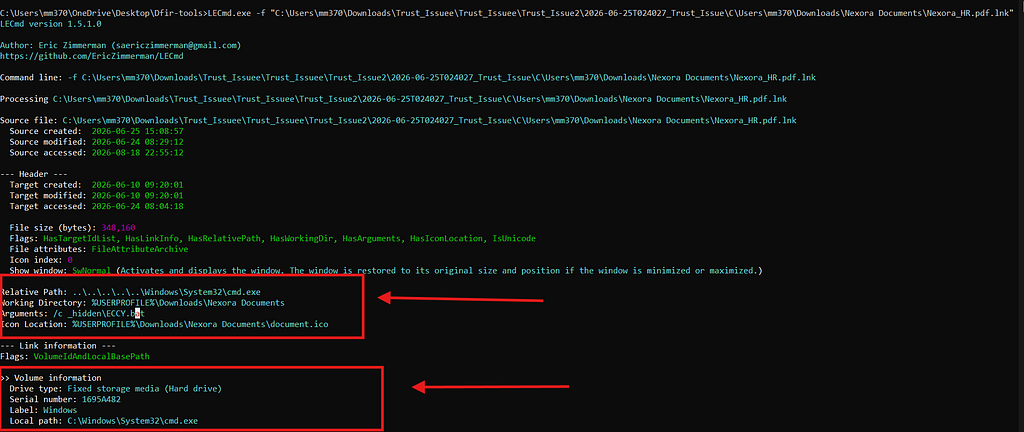
The command line arguments point to a hidden script:
- Answer:
ECCY.bat
Q5: What is the name of the legitimate binary (LOLBin) that the attacker utilized to deliver the malicious payload onto the compromised system?
We inspect the Windows Prefetch directory (C:\Windows\Prefetch) to identify binaries executed during the incident. Parsing with PECmd.exe:
PECmd.exe -d "...\C\Windows\prefetch" --csv "...\Solver" --csvf "prefetch.csv"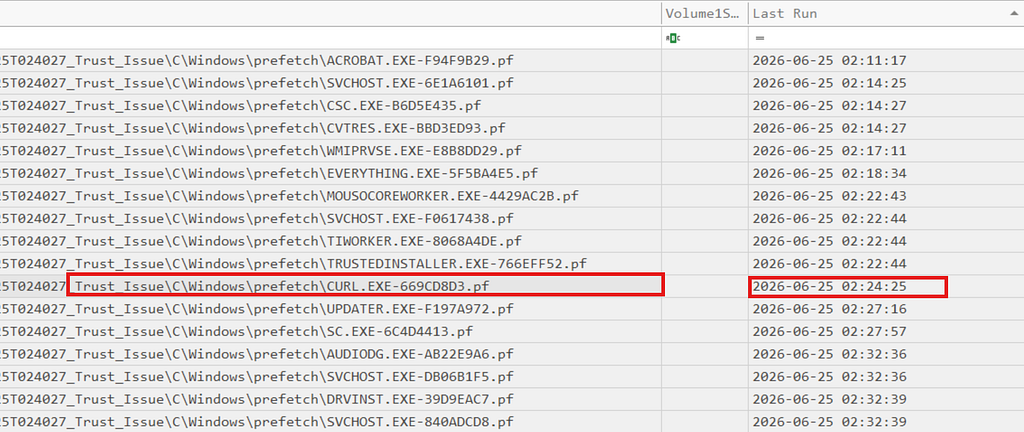
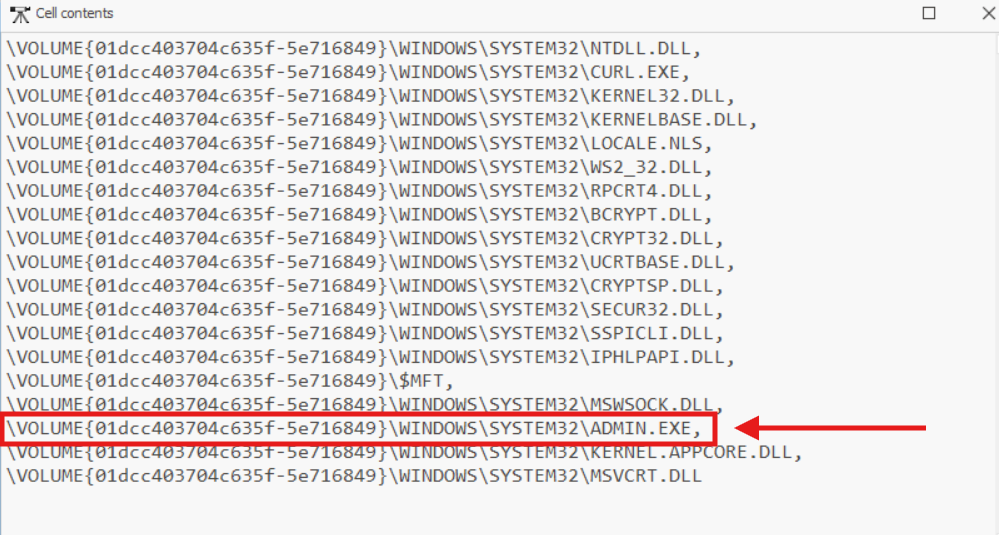
curl.exe (a legitimate Windows Living-off-the-Land Binary) was abused to fetch a binary named ADMIN.exe and drop it into System32.
- Answer:
curl.exe
Q6: What is the full path of the delivered malicious Payload?
From the prefetch and execution artifacts:
- Answer:
C:\Windows\System32\ADMIN.exe
3. Persistence Mechanism & Threat Mapping
Q7: The attacker established a persistence mechanism to automatically trigger the delivered payload. What is the name of the component responsible for this execution?
Prefetch logs reveal sc.exe was executed immediately after ADMIN.exe was downloaded. Inspecting the offline SYSTEM registry hive under:
HKLM\SYSTEM\CurrentControlSet\Services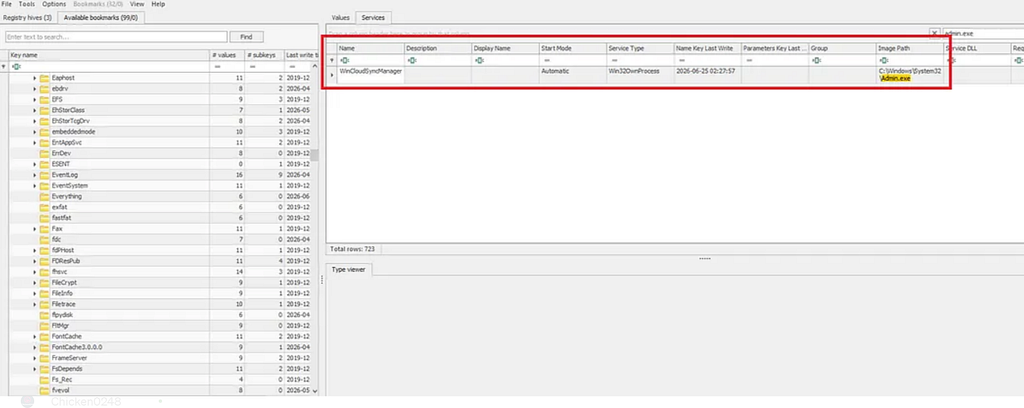
A newly registered service points to C:\Windows\System32\ADMIN.exe.
- Answer:
WinCloudSyncManager
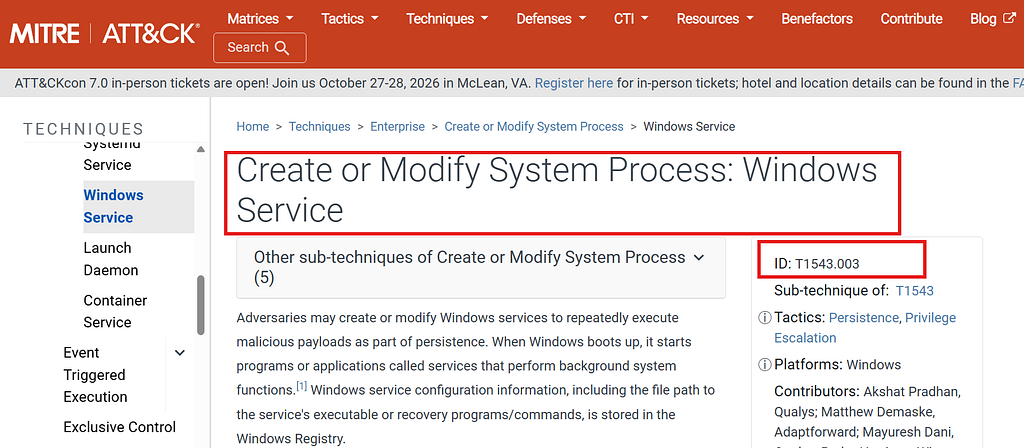
Q8: The attacker aimed to establish persistence what is the MITRE ATT&CK ID of the used technique? Format (T*.)
Creating or modifying Windows services for persistence maps directly to MITRE ATT&CK:
- Answer:
T1543.003
4. Recovering the Non-Resident Message & Final Flag
Q9: The attacker left a message for the victim trolling him, Get the main content of that txt file
On the Desktop, a file named St3Y_H3MbLe.txt was created. Parsing the NTFS USN Journal ($Extend\$J) with MFTECmd.exe:
MFTECmd.exe -f ...\C\$Extend\$J --csv "...\Solver" --csvf "usnjrnl.csv"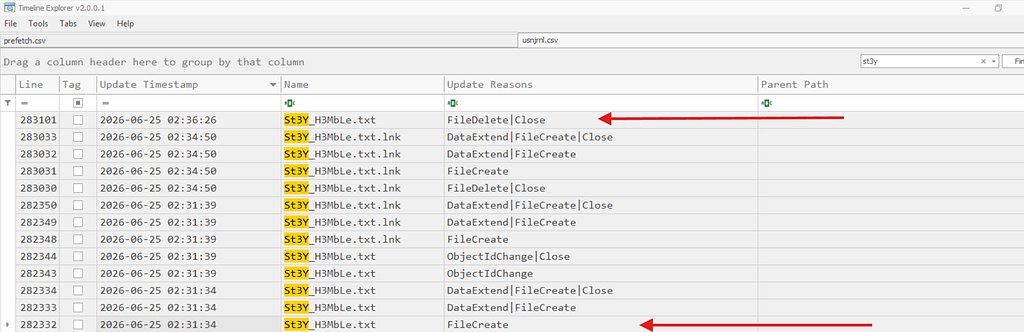
Because the data was non-resident and the original clusters were deleted, we examine the Windows Search Index Database (Windows.edb) located at:
C:\ProgramData\Microsoft\Search\Data\Applications\Windows\Windows.edbUsing SIDR (Search Index Database Reporter) to extract indexed text columns from the ESE database:
./sidr -r to-stdout /mnt/c/.../Windows | grep -i "st3y"
A wise man once said:
        ----D0n't_Trust_Just_V3rify-------
Said by Ab0L3TA- Answer:
D0n't_Trust_Just_V3rify
Q10: What is the exact creation time of this txt file on the victim machine? Format (YYYY-MM-DD HH:MM:SS)
From the $J USN Journal timestamp analysis:
- Answer:
2026-06-25 02:31:34
Final Flag

EYCC{4lw4ys_V3r1fy_th3_S0urc3_B3f0r3_0p3n1ng_4ny_Susp1c10us_D0cum3nt}