بِسْمِ اللَّـهِ الرَّحْمَـٰنِ الرَّحِيمِ
Overview
So let’s start with the challenge.
The challenge starts with three files (after extracting the folder with password infected, the usual password used for malware samples).
You will find 2 files:
metoubas v3.exe
Flag.txt.metoubas
First thing you will notice if you run the .exe file in a VM or debugger, the program will exit in a few seconds.
So let’s patch it to make it work in a VM normally.
Anti-VM & Debugger Patching
At first we will look in imports.
We detected an ExitProcess function.
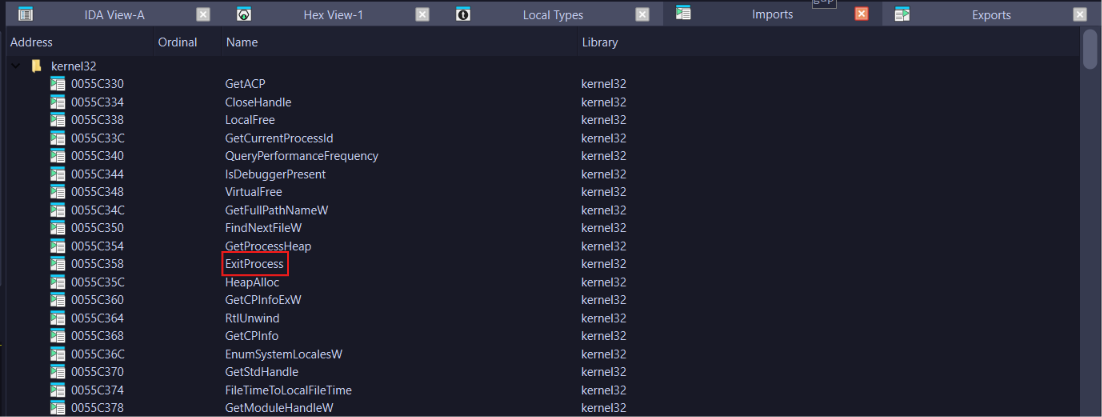
Double click on it and we will see this:
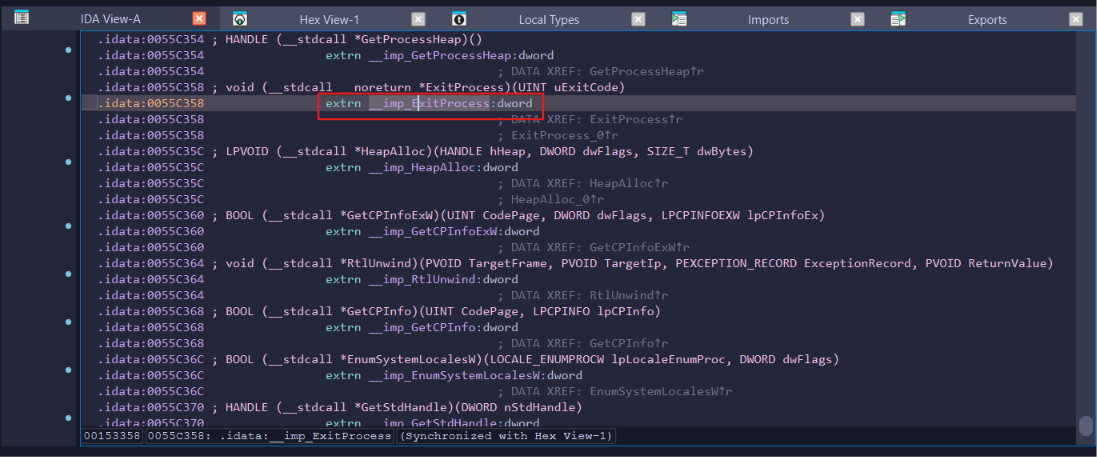
Press X here:
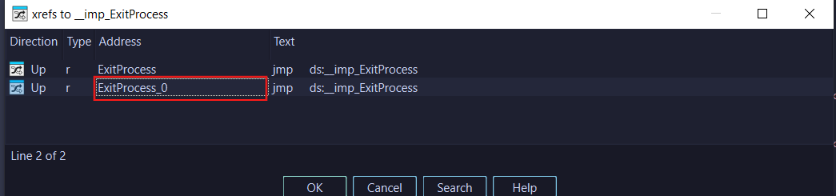
Go here:
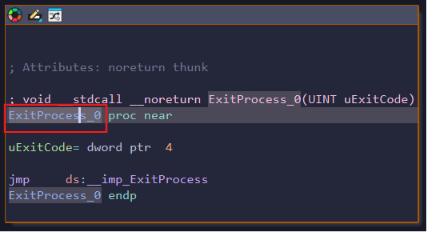
Press X on this function:
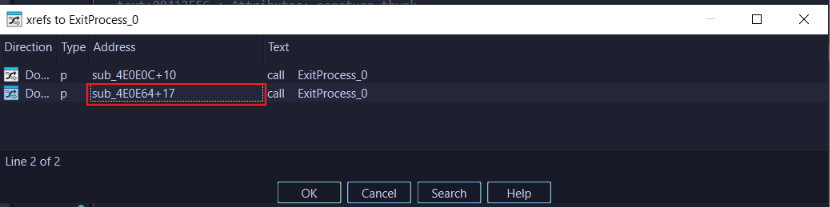
Go here:
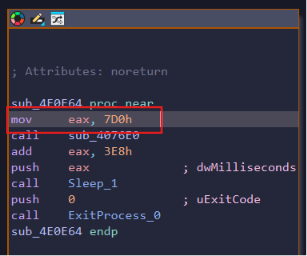
Stand on the first instruction.
Press in Menu Bar Edit->Patch program->Assemble... and write ret instead of mov eax,7d0h, then the .exe file will run in VMs and debuggers.
Dynamic Behavioral Analysis
So let’s do some basic dynamic analysis. We open procmon and set a filter on filename which is challenge.exe.
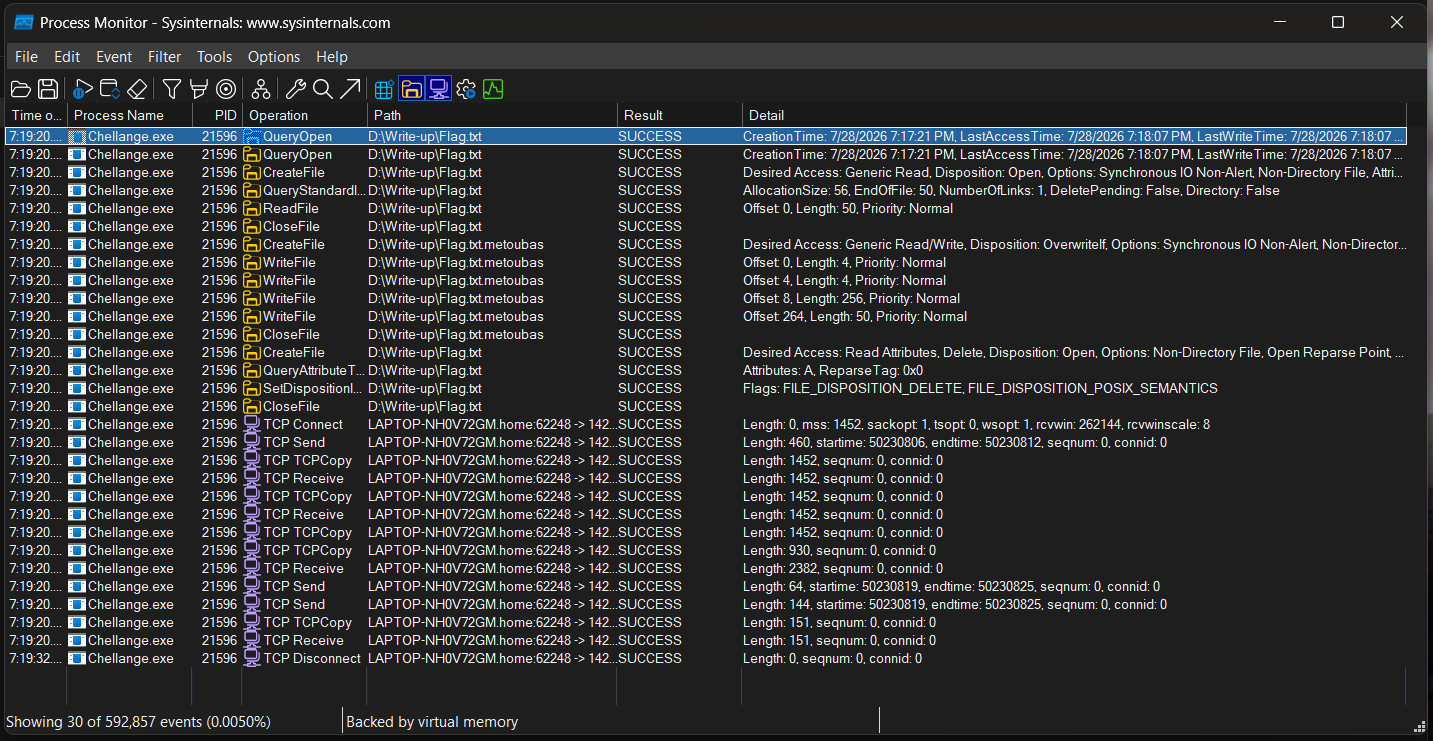
We see that the file reads the surrounding files, encrypts them, and deletes the original file. Also we noticed here that it uses a tcp connection, so I guess it’s the C2 server.
Static Binary Analysis & Encryption Routine
Let’s open it in IDA and see what does it do specifically.
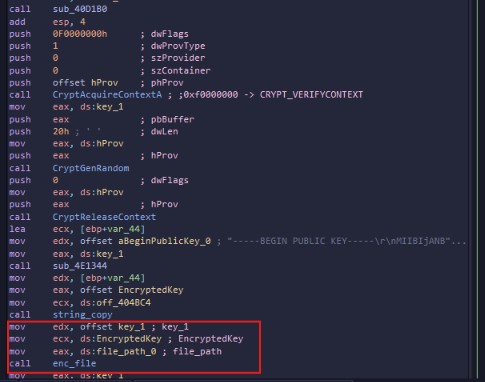
We got that function we rename enc_file in main function with 3 arguments:
arg1=the key that generated randomly
arg2=the encrypted key with RSA as we see the begin of the public key string
arg3=file path from the current folder
And that is all we want because it’s what all the file does: encrypt files. So let’s analyze it.
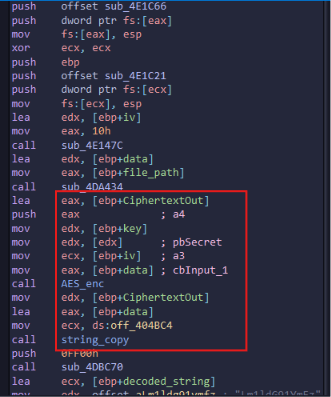
As we see here, AES-enc function encrypts the target file’s data and appends it to the data string.
Let’s analyze that function to know which mode it uses.
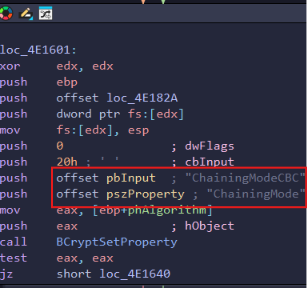
If we double click here, we will go to the data section and see these strings:
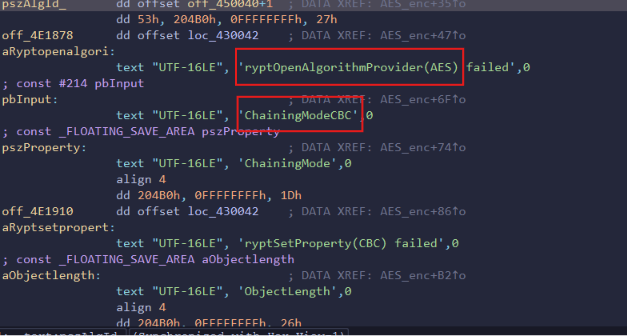
So we knew the encryption type is AES, and the encryption mode is CBC.
Now we need Key and IV.
Decoupling the Custom File Structure
If we go back to enc_file function, we will notice there’s a function called 5 times.
I analyzed it and figured out it’s a write function, so I renamed it to write_buffer.
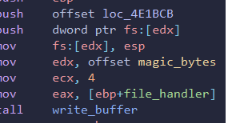
First call it writes 4 bytes on top of the file; those bytes are M 0 T 0.
So that’s the magic bytes signature.
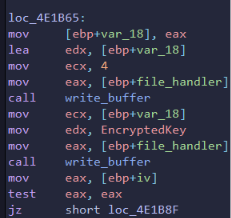
Inside loc_4E1B65, the malware writes the length of the encrypted key (4 bytes) to the file, and appends the actual EncryptedKey with RSA to the file.
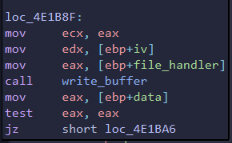
In loc_4E1B8F, it writes IV buffer to the file:
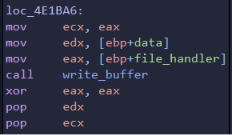
The last call, it writes the encrypted data with AES (payload).
The file structure now is:
+-------------------------------------------------------+
| Magic Bytes (4 Bytes)                                 |
| "M0T0"                                                |
+-------------------------------------------------------+
| Encrypted Key Length (4 Bytes)                        |
| Size of the RSA-encrypted key                         |
+-------------------------------------------------------+
| Encrypted Key (RSA)                                   |
+-------------------------------------------------------+
| IV Buffer                                             |
+-------------------------------------------------------+
| Encrypted Data                                        |
| (AES-CBC Payload)                                     |
+-------------------------------------------------------+
Network & C2 Traffic Analysis
Okay we now know what it’s doing with files, let’s figure out what it does with the network.
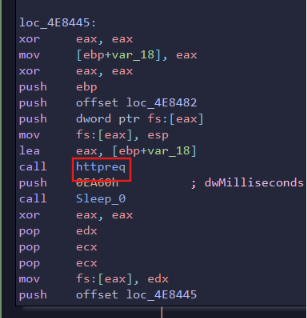
I caught this function, let’s analyze it:
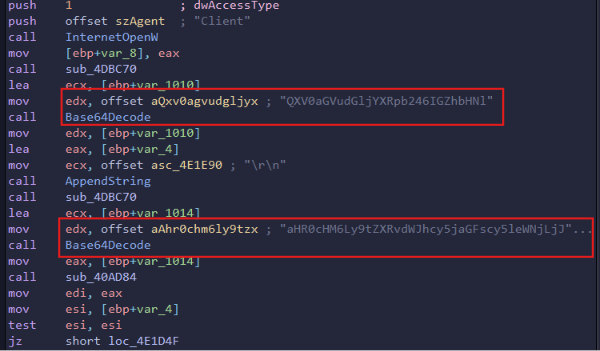
We got 2 strings, let’s decode them:
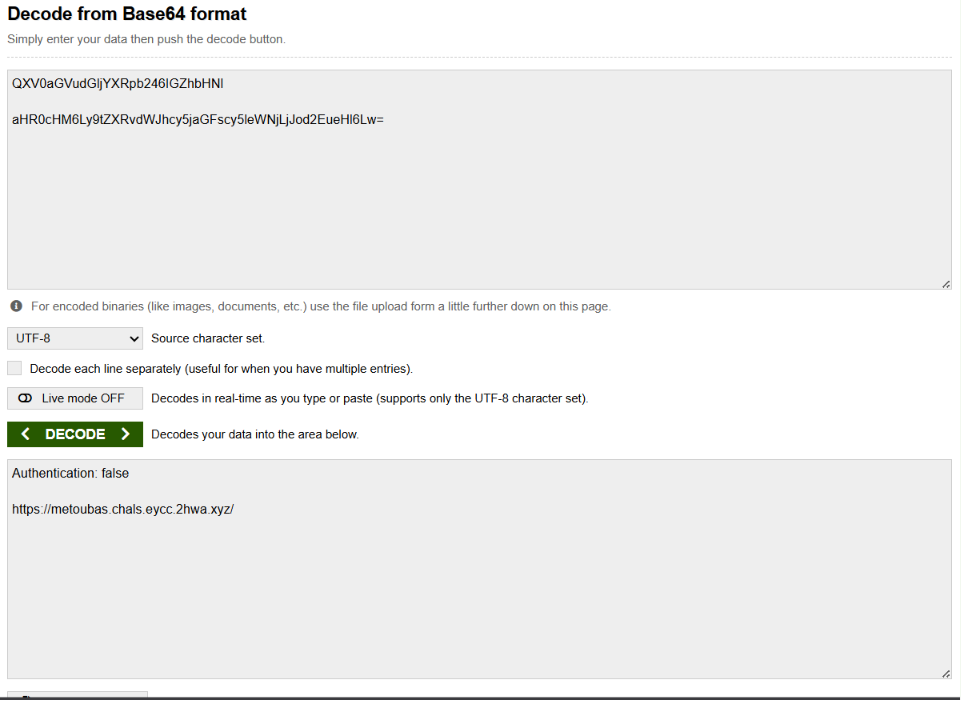
We got a URL and a header, but that header’s value is false, so let’s make it true and send a request.
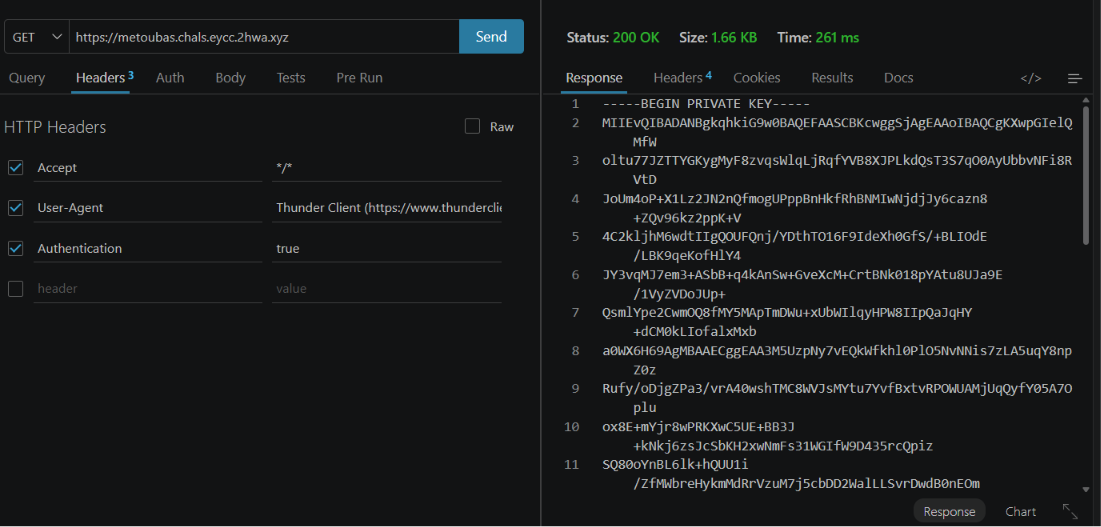
Nice, we got the private key! That private key is what we will decrypt the AES key with.
Decryption & Flag Extraction
To recover the flag, I wrote a Python script to parse the infected file (Flag.txt.metoubas) based on the file structure. The script uses the RSA private key to decrypt the AES key, then extracts the AES Key, IV, and Ciphertext in Hex format.
import struct
import sys
from cryptography.hazmat.primitives import serialization, hashes
from cryptography.hazmat.primitives.asymmetric import padding

PRIVATE_KEY_PEM = b"""-----BEGIN PRIVATE KEY-----
MIIEvQIBADANBgkqhkiG9w0BAQEFAASCBKcwggSjAgEAAoIBAQCgKXwpGIelQMfW
oltu77JZTTYGKygMyF8zvqsWlqLjRqfYVB8XJPLkdQsT3S7qO0AyUbbvNFi8RVtD
JoUm4oP+X1Lz2JN2nQfmogUPppBnHkfRhBNMIwNjdjJy6cazn8+ZQv96kz2ppK+V
4C2kljhM6wdtIIgQOUFQnj/YDthTO16F9IdeXh0GfS/+BLIOdE/LBK9qeKofHlY4
JY3vqMJ7em3+ASbB+q4kAnSw+GveXcM+CrtBNk018pYAtu8UJa9E/1VyZVDoJUp+
QsmlYpe2CwmOQ8fMY5MApTmDWu+xUbWIlqyHPW8IIpQaJqHY+dCM0kLIofalxMxb
a0WX6H69AgMBAAECggEAA3M5UzpNy7vEQkWfkhl0PlO5NvNNis7zLA5uqY8npZ0z
Rufy/oDjgZPa3/vrA40wshTMC8WVJsMYtu7YvfBxtvRPOWUAMjUqQyfY05A7Oplu
ox8E+mYjr8wPRKXwC5UE+BB3J+kNkj6zsJcSbKH2xwNmFs31WGIfW9D435rcQpiz
SQ80oYnBL6lk+hQUU1i/ZfMWbreHykmMdRrVzuM7j5cbDD2WalLLSvrDwdB0nEOm
FXJibF4wLQq0Swjd4QCwpBPwnHhivo5geL4iCMZlg/vN5jC8TeXiF+jMGRTc6TQi
Inwy4gZksRArlMt+OJEIJmEGRvEG8AKqpklabe6YcQKBgQDgDo7ZoZnB3XwFa37e
tMJhihQIA6SeOURRihCR/otTc9bSYnA7Lc3WRfIn33rQn+9cDI2+/bc2aJn/U74H
WHclJNk+PZ4x8KQBi+3GMB2D8Pl08BQHwtH/YSsqq0St729T5oe+HpeI6jMDD7lP
TyBOqRUpkIC0CsAJlmOtc4ibMQKBgQC2/vJn1XMIK01NTY9RWK82KaQbQ9ZbckeX
TpnrLFveITj1K3nz+1Eib+/6v/QIL73PZf2TXF1Os8ysTUn6TF/zNMLSFqGi5hMq
AdzUJXMVbG2svIkmPaslf9qG6PVM8Vc8ZHrZg8C+GFbmxfWjZzbPeM9W+FXejAog
ZHfY07ihTQKBgAULzuPP4+qd1mE43o6de5M+zNyxWE/H8mXzuhPPq8uhXEE4vlZW
3b/pq16Chf2U3IsyLS8T/8BV8sHxXOJFd8l6Xvor4Rg21zrBsAU6qC+Eidm8Xnce
SCR8R8CaQt23+sXk90Gs5rTKsYNsIzxKB+w9mqBpBL0JUPHmVTBe3cDBAoGASlrb
Gg+j1uzpUwCxvCbhwos28BEnVy7fIf7BEcqLZX1wTEYnHli+hdSf2O4H9Q+Y+12A
pFDCZQkvn88jwP0pe4OzqXOip7L+lHH/TYAN++V7xtUwkQY7tVf27hxYF7R0csiN
FjavqU3weYJ0Jbn5jmGTNc5f7bZPIwxPmh2lBn0CgYEAq2mfdOpjbuIWIzLp8BHF
VfbaG3wUsijBRFq2DvY2W2XCDtJsYvnGAO8W7Je8/BFfusI0ZIzVrXh84luyQcbl
9jaaiRSPgRlwy9ucI/r1YZ+MZFUwk2p0QUtkGVCGVexhijbtsY9puVrTubj/6G2z
ZpWEJT/kCFtvtBFbBx3TvBI=
-----END PRIVATE KEY-----"""

with open(sys.argv[1], "rb") as f:
    data = f.read()

offset = 4
key_len = struct.unpack("<I", data[offset:offset+4])[0]
offset += 4

encrypted_key = data[offset:offset+key_len]
offset += key_len

iv = data[offset:offset+16]
offset += 16

ciphertext = data[offset:]

priv_key = serialization.load_pem_private_key(PRIVATE_KEY_PEM, password=None)

aes_key = priv_key.decrypt(encrypted_key, padding.PKCS1v15()) # to decrypt the AES key and use it in cyberchef

print("AES key:", aes_key.hex())
print("IV     :", iv.hex())
print("Ciphertext:", ciphertext.hex())
Running the script outputs:
D:\metoubas-v3>py main.py Flag.txt.metoubas
AES key: aef5cf0849bca0c33e7fae1da43f2fe6bcabf578791c20c32487fa3988ffdc94
IV     : b601d84b63f39c2ce1356057fd72bd4f
Ciphertext: f59bed9223894555a484939d0efc99f4dcd3f1b3ab4957d0774f91e7e52bfed5b1f218793794a0413947f8f4de05c676106bb7081d9a207acfff451a9d826cfc
Go to CyberChef and select AES Decrypt with CBC mode and Hex input:
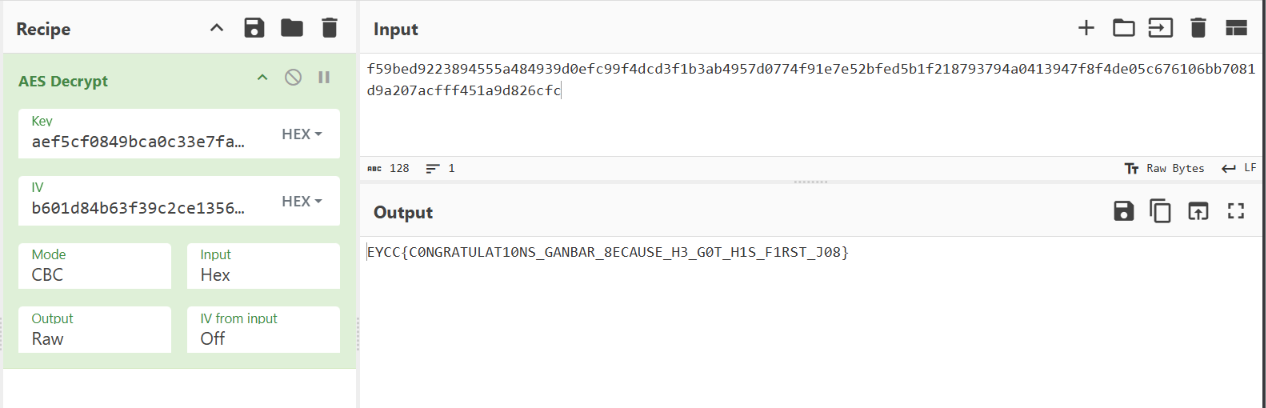
And yeah, we got the flag!
📚 References & Further Reading
If there’s anything you don’t understand, feel free to reach out.